Advanced Settings
Due to standardized DNAvi Inputs, in most times our default values will work. However, customized changes to constants.py allow to you to modify these parameters.
Warning: ALWAYS SAVE A COPY OF constants.py BEFORE YOU MAKE ANY CHANGES.
Customizations can help should you experience that your expected bands are not detected, or you still have too much marker band inside your plot.
Where to find Advanced Settings
Your band detection settings are in DNAvi/src/constants.py Simply open the file in a Text Editor:
Format of the constats.py file
########################################################################################################################
# BAND DETECTION SETTINGS
########################################################################################################################
# Peak detection ladder
DISTANCE = 20 # 20 pos apart min
"""Minimum required distance of two peaks to be discriminated."""

MIN_PEAK_HEIGHT_FACTOR=0.2
"""Factor by which to multiply the maximum peak height to set the minimum peak height to be detected. """

MAX_PEAK_WIDTH_FACTOR=1
"""Fraction of entire gel length to set the maximum accepted peak width - ONLY FOR THE LADDER, not for sample peaks"""

PEAK_PROMINENCE=(0.2, None)
"""Tuple, minimum peak prominence """

# Constants for basepair annotation
INTERPOLATE_FUNCTION="linear"
"""Function to interpolate missing base pair values based on user-annotated values """

BACKGROUND_SUBSTRACTION_STATS=0.1
"""Int, fraction of max peak to be removed from dataset for statistical testing \
higher -> lower sens but pot better discrimination, lower -> sens up, more noise """

HALO_FACTOR=0
"""Int, an optional addition to remove more base-pair positions if automatic marker cropping is either \
insufficient or if a smaller window of the DNA data shall be analysed. \
Default value is 0 (= no additional cropping, only auto-detection). \
It is suggested to start with values of 0.1 (will add 10% on top of the marker position)."""

ARTIFICIAL_MAX=100000
"""Int, artificial maximum base-pair position to interpolate positions beyond upper marker \
 or in cases where there is no upper marker."""
Example: Adjusting Peak (Band) calling parameters
For example, let’s assume your two left ladder band peaks were not detected:
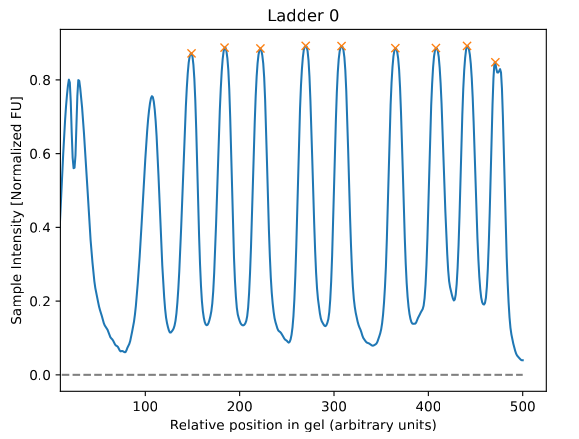
A quick look into constants.py shows us, that the MIN_PEAK_HEIGHT_FACTOR is set indeed quite high (to 0.9), meaning the peak must be higher than 90% of the max intensity to be detected:
MIN_PEAK_HEIGHT_FACTOR=0.9
"""Factor by which to multiply the maximum peak height to set the minimum peak height to be detected. """
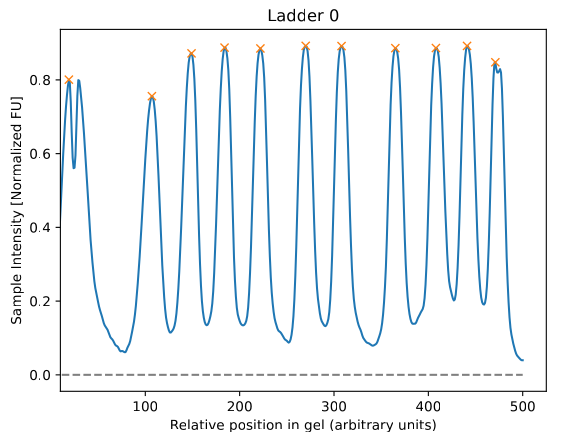
So let’s change that to 0.2 to be more liberal allowing smaller peaks to be detected (>20% of the max intensity):
MIN_PEAK_HEIGHT_FACTOR=0.2
"""Factor by which to multiply the maximum peak height to set the minimum peak height to be detected. """
Now our two left markers are detected, as indicated by the orange cross:
Other parameters
Other parameters include the peak prominence, the minimum distance between peaks, background substraction for statistics and the interpolation function to retrieve missing base pair positions based on the ladder. They are described in the API reference and can be adjusted by advanced users/developers as needed.