Inputs
DNA signal tables
Tables have to be in .csv format and fulfill all criteria below:
Columns are separated by comma (,)
Decimals are separated by dot (.)
The first row is the header
Marker column is always named “Ladder” - if this is not the case, the default will be to use the first column as the Ladder column unless otherwise specified with the –marker_lane argument
Sample names in header (not allowed: “,;’’!.” or white space)
Sample names must match metafile sample names (if provided)
All column values are numeric (and refer to DNA band intensity units)
Ladder |
Sample_1 |
Sample_2 |
Sample_3 |
Sample_4 |
… |
|---|---|---|---|---|---|
2.989603 |
2.42713 |
0.7146179 |
6.35804 |
2.991041 |
… |
3.360477 |
2.020639 |
0.6151214 |
6.315273 |
2.731391 |
… |
3.430417 |
1.893378 |
0.4197658 |
5.906331 |
2.643009 |
… |
3.303449 |
1.909102 |
0.239225 |
5.269081 |
2.614673 |
… |
3.102744 |
1.923925 |
0.1669339 |
4.50062 |
2.445065 |
… |
2.748271 |
2.036593 |
0.1851551 |
3.647917 |
2.159403 |
… |
3.560105 |
2.393621 |
0.116698 |
3.304178 |
2.076624 |
… |
3.546266 |
2.70818 |
0.02938752 |
3.756241 |
1.825265 |
… |
2.772796 |
2.508052 |
0.1692096 |
4.833201 |
1.390767 |
… |
2.061934 |
2.383395 |
0.4488774 |
5.237878 |
1.081664 |
… |
… |
… |
… |
… |
… |
… |
0.9224262 |
0.4266619 |
0 |
0 |
1.080067 |
… |
DNA gel images
Input images have to follow DNAvi’s requirements to ensure successful evaluation.
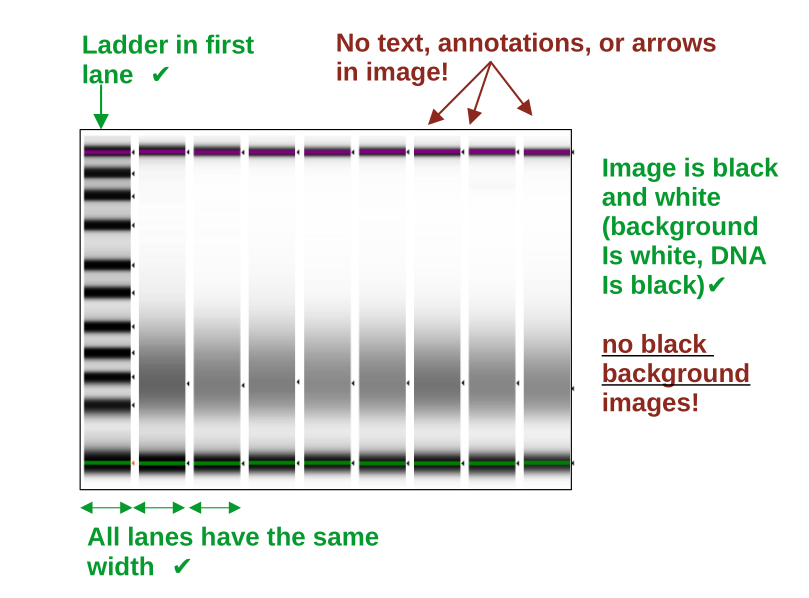
The image input is naturally more variable than providing a signal data table. Therefore, adhering to the following requirements will ensure optimal results and reproducibility:
the format is .png, .jpg, or .jpeg
the maximum file size is 16 MB
the gel image needs is black & white (white background, black DNA bands)
the ladder/marker is in the first lane only
lanes are straight and have the same width
no arrows, text, annotations, or objects are in the picture
no frame is surrounding the image (crop the image if needed)
keep a bit of whitespace around the upper/lower markers, so that they can be identified as individual peaks
the image has good contrast and is equally contrasted across all lanes (important to assure that bands are recognized)
Note: Inputting an inverted standard DNA agarose gel image may work, but its on your own risk and you may want to carefully check in the output folder if the bands were properly segmented. We highly recommend using only virtual gels from capilarry electrophoresis machines for optimal performance.
Multiple inputs
If you wish to screen multiple files, put them into a single folder and use the path to this folder as input to DNAvi.
python3 DNAvi.py -i /path/to/input/files -l ladder.csv -m meta.csv